Shopify app for ad tracking
Every sale, credited to the ad that earned it.
dataMonitorio sends complete storefront and checkout data to Google, Meta, TikTok and 7 more platforms. Set up in minutes, with no code and no developer, and you'll know the moment tracking breaks.
- Free plan
- Billed through Shopify
- No code to paste
Sends complete data to the platforms you advertise on
The problem
Ad platforms can only optimise for the sales they see
Shopify's new checkout no longer runs the tracking scripts stores used to paste in. Sales go missing, ad platforms learn from half the picture, and often nobody notices until the numbers look wrong.
Checkout is a blind spot
Purchases that never reach Meta or Google Ads can't be credited to the ad that earned them, so budgets drift to the wrong campaigns.
Broken tracking goes unnoticed
An expired token or a changed tag can quietly stop conversions for weeks. Usually you find out when results drop.
Fixing it usually needs a developer
Server-side tracking, consent mode and click IDs are hard to set up correctly without a specialist.
How it works
Live in minutes, not weeks
One app adds a complete dataLayer to your storefront and checkout. Ready-made GTM containers send it to each platform.
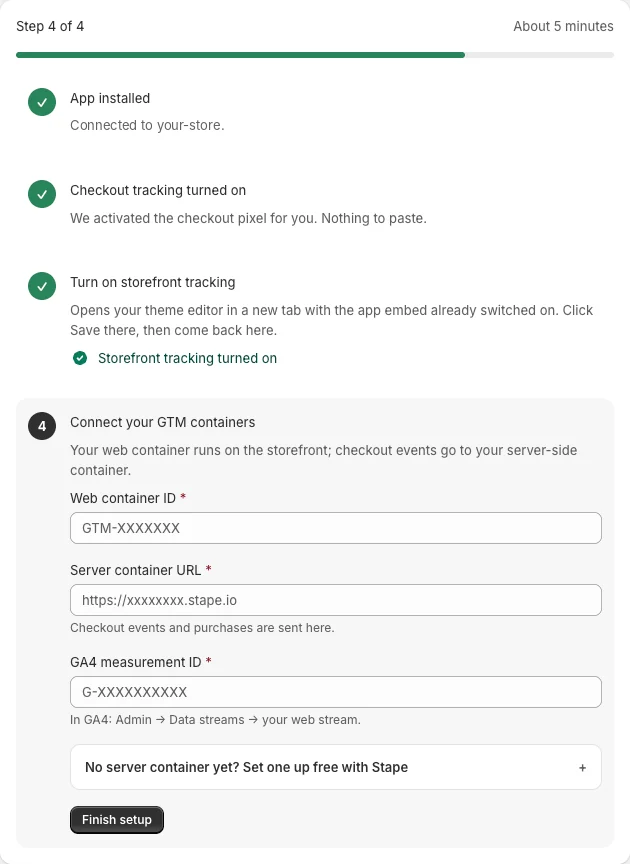
Install and switch on
Install from the Shopify App Store. Checkout tracking turns on automatically; storefront tracking is one click in your theme.
Import your GTM containers
Download ready-made web and server containers for the platforms you use and import them into Google Tag Manager.
Test, then keep watching
Place a test order and see each event reach each platform (Growth and Pro). On Pro, Analytics keeps watching and emails you if a platform stops.
Pro
Analytics (delivery monitor)
Know the moment tracking breaks
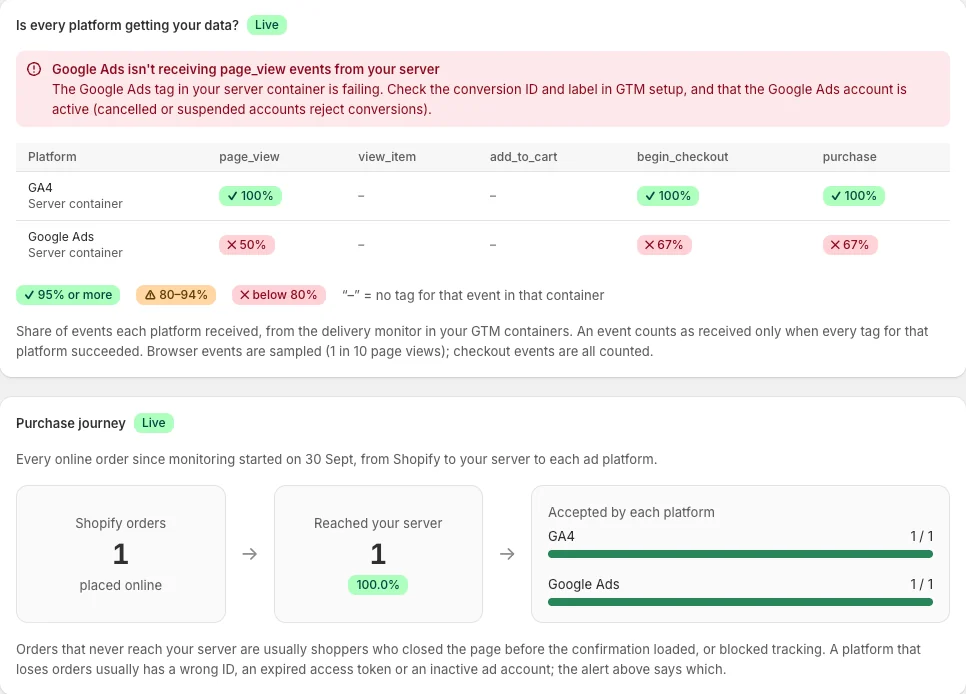
See, event by event, whether GA4, Google Ads, Meta and the rest received your data. If a platform stops, you get an email that says what failed and how to fix it.
- Event-by-event delivery for every platform
- Plain-English alerts with the likely cause
- Purchase journey from Shopify to each platform
- Sales by channel, first click and last click
Storefront + checkout
One complete dataLayer, everywhere shoppers buy
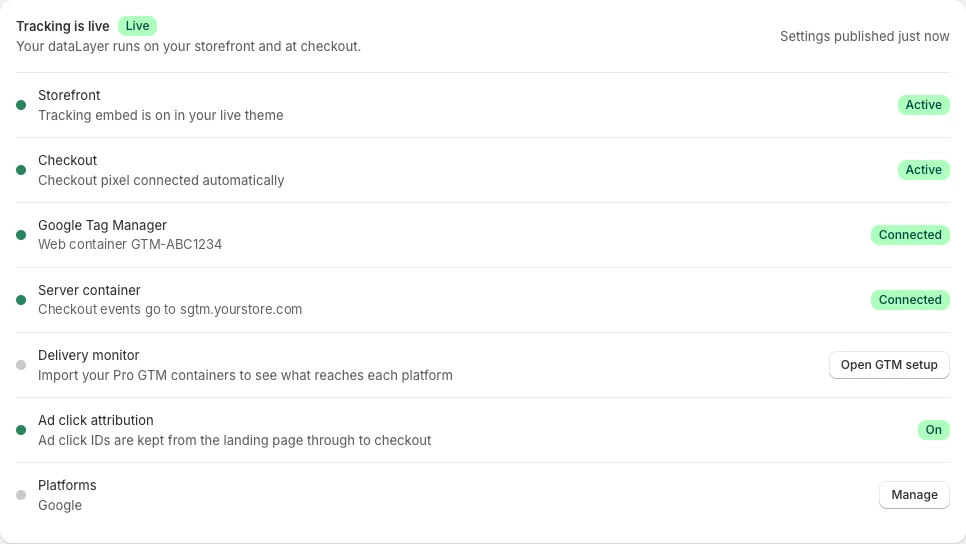
dataMonitorio adds a standard dataLayer to every storefront page and to Shopify checkout, in the format each platform's tags expect.
- Checkout pixel connects automatically
- Ad click IDs kept from landing page to checkout
- Logged-in customer data for better ad matching
Pro
Know your customers
See which channels bring your best customers
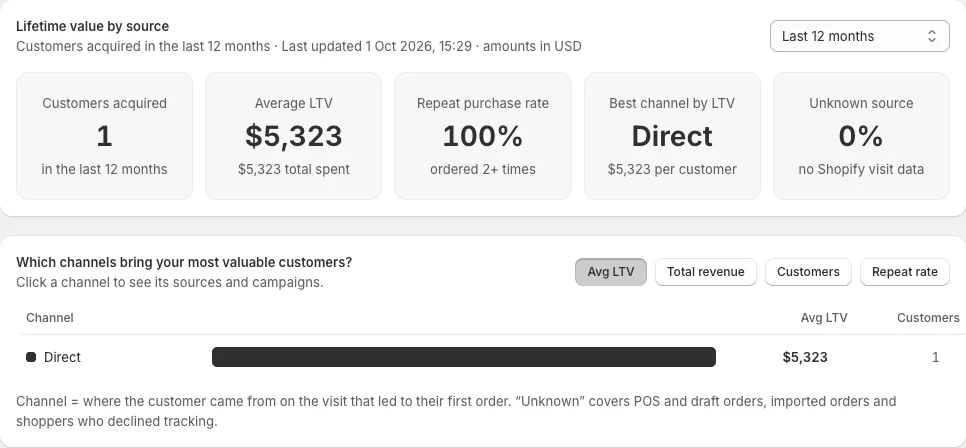
Lifetime value by marketing channel, read live from Shopify. Find the channels worth more budget, not just the ones with the cheapest clicks.
- Lifetime value and repeat rate by channel
- Customer list with lifetime value and where each customer came from
- Customer details stay in Shopify
Consent
Tags follow each shopper's choice
Works with Shopify's cookie banner and popular consent platforms, with Google Consent Mode and Microsoft Consent Mode built in.
Google + Microsoft Consent Mode
Consent signals reach your Google and Microsoft tags, so they respect each shopper's choice. Without marketing consent, personal data and ad click IDs are removed from every event.
Your cookie banner
Shopify's own banner, or a consent platform such as CookieYes, Cookiebot, OneTrust, Pandectes or Consentik. A custom consent cookie works too.
Your own server container
Checkout events go to your server-side GTM, hosted where you choose (we recommend Stape) and best run on your own subdomain for first-party tracking. Shopper traffic never touches our servers.
Pricing
Start free. Upgrade when you need every platform.
Billed through Shopify on your normal invoice. Change or cancel any time.
Free forever
Google tracking on your storefront and checkout.
- Storefront + checkout dataLayer for GA4 and Google Ads
- Shopify's cookie banner + Google Consent Mode
- Works with your own GTM and server-side GTM
- Help center and guides
14-day free trial
Every ad platform, with ready-made GTM containers.
- All 10 destinations: GA4, Google Ads, Meta, TikTok, Pinterest, Snapchat, LinkedIn, X, Reddit, Microsoft Ads
- Every supported cookie banner + Microsoft Consent Mode
- Ready-made web and server GTM containers
- Test order check: every event, every platform
- Email support
14-day free trial
Growth plus post-purchase tracking and reports that show what your tracking is worth.
- Everything in Growth
- Analytics (delivery monitor): is every platform getting your data?
- Customer lifetime value by marketing channel
- Email alerts when a platform stops receiving data
- Post-purchase upsells from any app, sent to GA4 and your ad platforms
- Refunds and cancellations sent to GA4
- Subscription renewals tracked in GA4 (beta)
- Priority support
For agencies and freelancers
Set up client tracking in minutes. Earn from it for a year.
Join the partner program and earn 20% of what each linked store pays, on up to 12 monthly payments.
Do I need a developer to set this up?
No. Checkout tracking turns on automatically, storefront tracking is one click in your theme editor, and the GTM containers are ready-made. Step-by-step guides cover the rest.
Does it work with Shopify's new checkout?
Yes. dataMonitorio uses Shopify's own app pixel for checkout, so it works with checkout extensibility.
Which ad platforms are supported?
GA4, Google Ads, Meta, TikTok, Pinterest, Snapchat, LinkedIn, X, Reddit and Microsoft Advertising. The Free plan covers GA4 and Google Ads.
Do I need server-side GTM?
Checkout events are sent to a server-side GTM container that you host. Any host works, and you can start on a free plan. For first-party tracking we recommend Stape on your own subdomain, on a paid plan once your traffic grows.
Will it change my theme code?
No. Storefront tracking runs as a Shopify theme app embed and checkout tracking runs in Shopify's pixel sandbox, so nothing is pasted into your theme.
How am I billed?
Through Shopify, on your regular Shopify invoice. Change or cancel any time.
Every sale, seen.
Join the waitlist and be first to try dataMonitorio when it launches on the Shopify App Store.
- Free plan available
- Billed through Shopify
- No code to paste